The .tosc format
TouchOSC compresses an XML tree with zlib and calls the result a .tosc file. The editor can read and write every element in that tree, but it only displays the ones it has a UI for. This page describes the tree itself, which is useful whether or not you use py2tosc.
Everything here was verified against files written by TouchOSC 1.5.2.262.
The document
<?xml version='1.0' encoding='UTF-8'?>
<lexml version='6'>
  <node ID='c36776ac-90b0-11f1-990b-f2a3060a23c2' type='GROUP'>
    ...
  </node>
</lexml>
lexml is the root and carries a format version. TouchOSC 1.5 writes version 6; older releases wrote 3. The root holds exactly one <node>, always a GROUP, which is the layout's canvas.
Keys and string values are wrapped in CDATA sections. Saved .tosc files are written as a single line with no whitespace between elements; the editor's .xml export is the same document with a newline after every element.
A node
<node>
|__<includes>            (root node only, new in version 6)
|__<properties>
|  |__<property>
|     |__<key>
|     |__<value>
|__<values>
|  |__<value>
|     |__<key>
|     |__<locked>
|     |__<lockedDefaultCurrent>
|     |__<default>
|     |__<defaultPull>
|__<messages>
|  |__<osc>
|  |__<midi>
|  |__<local>
|__<children>
   |__<node>
Empty containers are omitted rather than written out: a LABEL with no bindings
and no children has neither a <messages> nor a <children> element. The same
holds inside a message -- one with no triggers has no <triggers> element at
all, rather than an empty one.
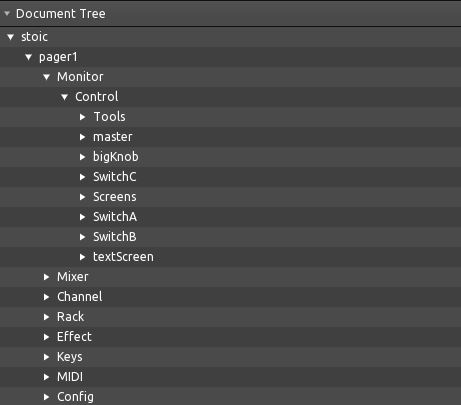
The editor's tree view shows only the nodes inside each <children>:
Everything else appears in the Control, Values, Messages and Script tabs:
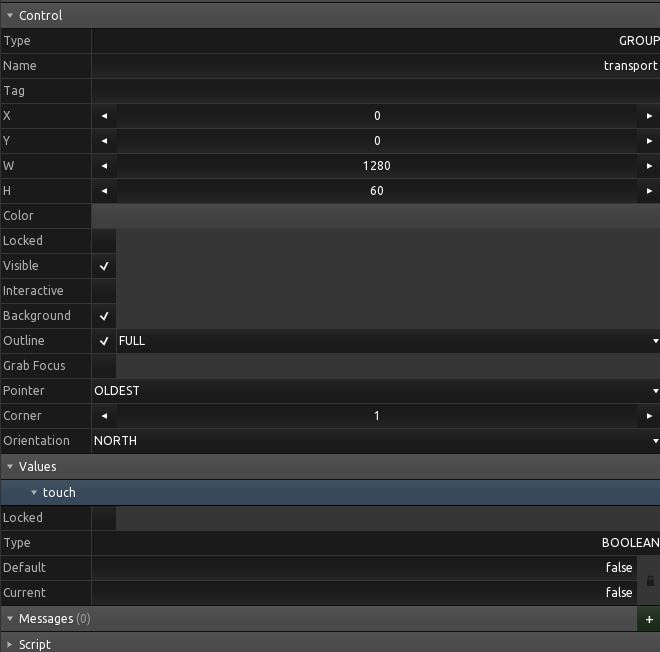
Hexler documents the available properties and values in the scripting reference.
Properties
A property is a typed key/value pair. The type attribute selects how <value> is read:
| Type | Meaning | <value> holds |
|---|---|---|
s |
string | text |
b |
boolean | 0 or 1 |
i |
integer | text |
f |
float | text |
r |
frame | <x> <y> <w> <h> |
c |
colour | <r> <g> <b> <a>, each 0.0-1.0 |
<property type='b'>
  <key><![CDATA[background]]></key>
  <value>1</value>
</property>
<property type='r'>
  <key><![CDATA[frame]]></key>
  <value><x>0</x><y>0</y><w>640</w><h>860</h></value>
</property>
Properties are written in alphabetical order by key.
Frame components are not integers. TouchOSC positions controls at sub-pixel
offsets, and its own layouts are full of frames like <x>417.439</x>. Rounding
them moves the control, so py2tosc keeps them as floats and writes integral
values back without a trailing .0.
Enumerated integers
About a dozen i properties hold a number standing for a name. Hexler's manual
lists the names in order but gives no numbers, and the two groups below do not
start from the same one:
| Numbered from 1 | Numbered from 0 |
|---|---|
shape, textAlignH, textAlignV |
orientation, buttonType, outlineStyle, cursorDisplay, barDisplay, linesDisplay, font, response, radioType, pointerPriority |
So shape 1 is a rectangle and there is no shape 0, while orientation 0 is
north. Reading the manual and counting from zero gets the first group wrong.
The split is recoverable from the files themselves: a property numbered from 0
writes a 0 somewhere across a large enough sample, and one numbered from 1 never
can. shape confirms it independently -- hexkeys.tosc stores its 119
hexagonal buttons as 6, and HEXAGON is the sixth name the manual lists.
py2tosc names all of these; see Named numbers.
The root node of a saved layout also carries metaCreator and metaComments,
which the editor fills in from the document settings.
Values
A value is the control's live state: x and y for continuous controls, touch for everything, text for labels, page for pagers.
<value>
  <key><![CDATA[x]]></key>
  <locked>0</locked>
  <lockedDefaultCurrent>0</lockedDefaultCurrent>
  <default><![CDATA[0]]></default>
  <defaultPull>0</defaultPull>
</value>
Booleans in <default> are spelled true and false, not 0 and 1 -- the one place in the format where that is so.
What changed in version 6
Relative to the version 3 files older tooling produced:
-
The root node carries an
<includes>element. It is empty in every file observed so far, but dropping it changes the document. -
Messages carry a
<noDuplicates>flag. -
<connections>is ten characters wide, one per connection slot. Version 3 used five.
py2tosc reads both. A file keeps the version it was saved with, so editing an older layout will not silently change its format; new documents are version 6. To upgrade an old layout deliberately, set the version before saving: